Picture bingo generator
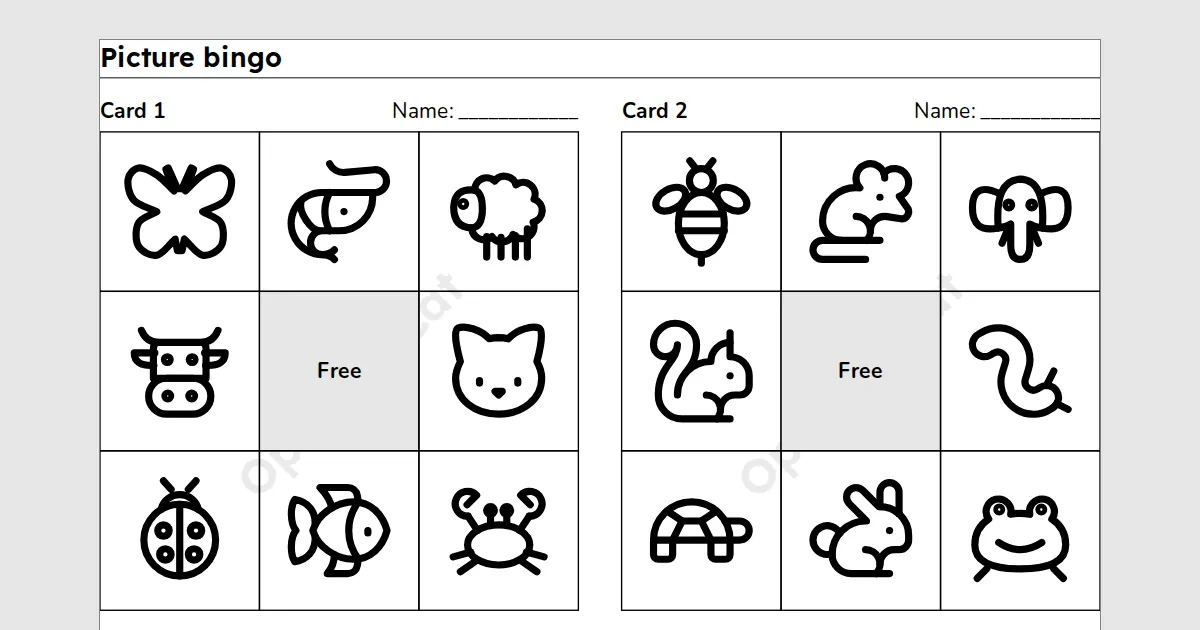
A picture bingo generator for teachers: pick a set of pictures, such as animals or shapes, and print different bingo cards and a call sheet for the class. It needs a free teacher account.
A printable for teachers. Pick a set of pictures, such as animals or shapes, and print different bingo cards with a picture in each square, and a call sheet with the name of each picture. Good for children who do not read yet. Free with a teacher account: sign in once on each device to build, save and print.
Key facts
- Cards
- Up to 60 different cards, with a picture in each square
- Paper
- A4 or Letter
- Print and PDF
- Made on this device; on Free a light watermark and the footer line; Add to book puts sheets in one PDF
- Languages
- 8 languages, including Hindi and Arabic
- Price
- Free
- Account
- A free teacher account; students never sign in
- No student accounts.
- No ads.
- Data-processing agreement on request.
How to make picture bingo cards
- Pick a set of pictures: classroom objects, animals, food, shapes or all of them.
- Choose the card size and the number of cards, one for each student.
- Print the cards and the call sheet, then call each picture by its name.
Questions teachers ask
Are all the cards different?
Yes. No two cards in a set are the same, and every picture of the set is on a card when you print enough cards.
What is the call sheet?
The last page, for you. It shows each picture on the cards once, with its name and a box to tick, in a mixed order.
Which pictures are there?
100 line drawings in four sets of 25: classroom objects, animals, food and shapes. Choose All pictures to mix the four sets.
Related tools
Counted per page. Report a problem for bugs.